A Clean Frontend Folder Structure Every Developer Should Know
A Clean Frontend Folder Structure Every Developer Should Know
Modern frontend development is much more than building simple web pages. Applications today include APIs state management reusable components business logic and many moving parts. Because of this complexity project organization becomes extremely important.
Many developers focus on writing features but ignore project structure. In the beginning everything may look fine. The project works and development continues quickly. However as the project grows the codebase slowly becomes difficult to manage.
Files are scattered in random folders. UI and business logic get mixed together. New developers struggle to understand the codebase. Small changes start taking more time than expected.
This is why professional developers follow a clean and scalable frontend architecture.
A well organized project structure improves readability maintainability and collaboration. It also makes it easier to scale the application in the future.
Below is a simple and practical folder structure that many modern frontend projects follow.
Why Folder Structure Matters
A clean folder structure provides several advantages for developers and teams.
Better maintainability When files are organized properly developers can quickly find the code they need to modify.
Better collaboration When multiple developers work on the same project a clear structure prevents confusion.
Better scalability As the application grows new features can be added without creating chaos in the project.
Better debugging When logic is separated into clear folders it becomes easier to track down problems.
Example Frontend Folder Structure
frontend
node_modules public src
api assets components context data hooks pages redux services utils
App.jsx
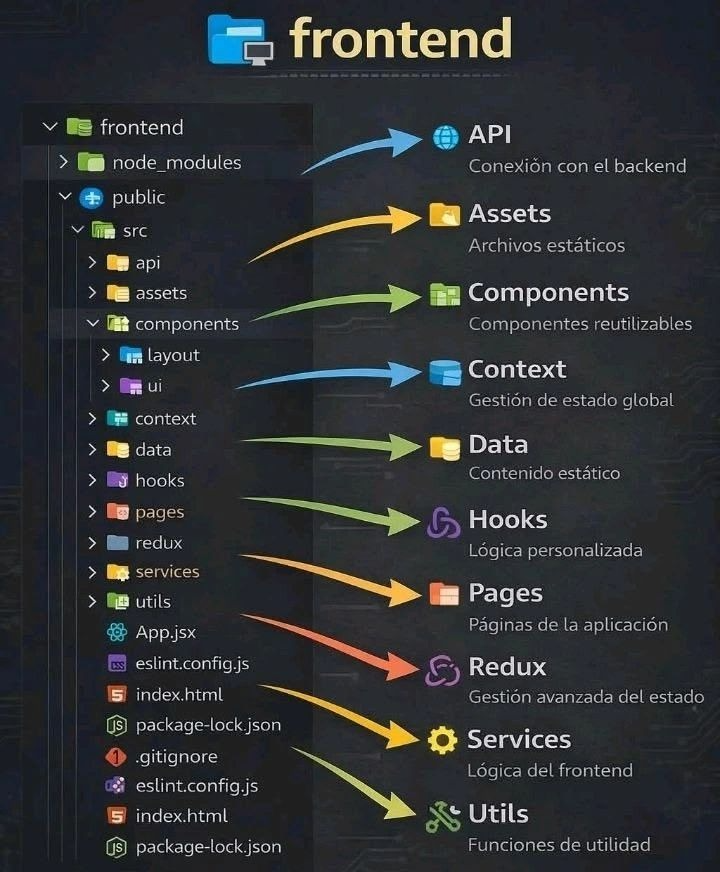
Each folder has a clear responsibility inside the application.
API Folder
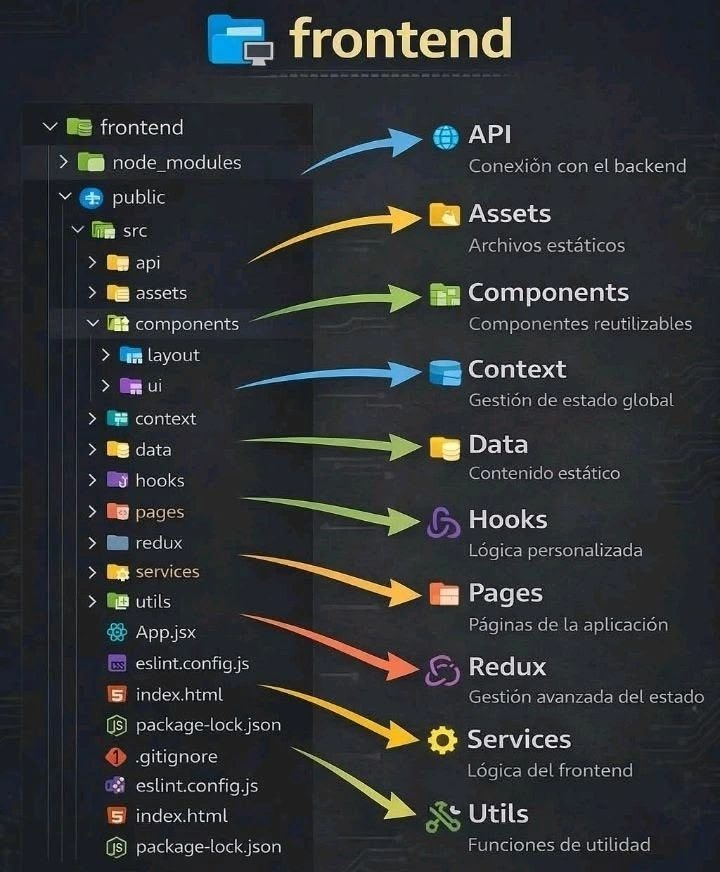
The API folder is responsible for communication with the backend server. This folder usually contains functions that send HTTP requests and receive responses from backend services.
Examples include fetching user data sending login requests or retrieving product information.
Keeping API calls inside a dedicated folder prevents them from being scattered across the project.
Assets Folder
The assets folder contains static resources used in the application.
Examples include images icons fonts and other design files. Storing them in a single location keeps the project clean and makes asset management easier.
Components Folder
The components folder contains reusable user interface components.
Examples include buttons cards navigation bars modals and form inputs.
Reusable components allow developers to write code once and use it across multiple pages. This reduces duplication and keeps the UI consistent throughout the application.
Context Folder
The context folder is used for global state management using React Context.
Sometimes multiple parts of the application need access to the same data. Context allows developers to share that data across components without passing props through many layers.
Examples include theme settings authentication data or user preferences.
Data Folder
The data folder stores static data or mock data used during development.
This can include sample JSON files configuration data or temporary datasets used before the backend API is ready.
Keeping mock data separate from the main logic keeps the codebase cleaner.
Hooks Folder
Hooks contain custom reusable logic.
In modern frontend development especially in React developers often create custom hooks to reuse complex logic.
Examples include hooks for fetching data managing forms handling authentication or tracking screen size.
Custom hooks make components smaller cleaner and easier to maintain.
Pages Folder
The pages folder represents the main screens of the application.
Examples include Home Dashboard Profile Login and Settings pages.
Each page usually combines multiple components and represents a full view inside the application.
Separating pages from components keeps the project easier to navigate.
Redux Folder
The redux folder is used for advanced state management.
In large applications many components depend on shared state. Redux provides a centralized store where all application state can be managed in a predictable way.
This folder typically contains slices reducers actions and store configuration.
Services Folder
The services folder contains business logic and external integrations.
Services often work together with APIs but focus more on application level logic rather than raw network requests.
Examples include authentication services payment integrations or data transformation logic.
Utils Folder
The utils folder contains helper functions used throughout the project.
Examples include formatting dates validating input generating IDs or performing small calculations.
By placing these helpers in a shared location developers can reuse them anywhere in the application.
Final Thoughts
A clean folder structure may seem like a small detail but it has a huge impact on long term development.
Projects with poor organization become harder to maintain and scale. Developers spend more time searching for files and fixing structural problems.
On the other hand well structured projects are easier to read easier to extend and easier for teams to collaborate on.
If you are starting a new frontend project consider setting up a clear structure from the beginning. It will save time reduce confusion and make your development workflow much smoother.
A clean structure leads to clean code and clean code leads to better software.
#frontend #webdevelopment #react #javascript #programming #softwaredevelopment #cleanarchitecture #coding #developerlife #tech #frontend-development #project-structure #scalable-architecture #components #hooks #state-management #best-practices #clean-code #frontend-architecture #web-apps #ui-ux #code-organization #developer-tips #modular-code #clean-frontend #tech-blogs #MuhammadYasir #YasirAwan4831
Written by Muhammad Yasir